< TOOLS FOR REVIT. Settings | TOOLS FOR REVIT. Check >
This setting allows you to add Work items that will be specified when using _Complete/Accept/Schedule tools . Prepare your own work type structure for the site. Specify the Work Code and Name, unit of measurement, and unit price.
Click Settings ➤ Settings ➤ Work items
Folders and work types can be added manually, or a ready-made Excel file can be imported (see the principle of filling in an Excel table).
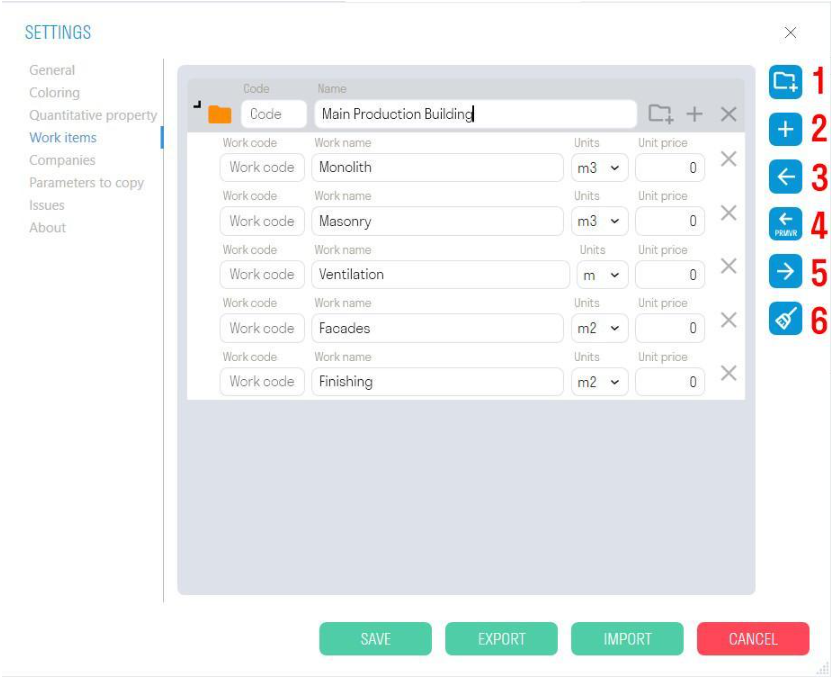
- Adding a new folder.
- Adding a new work type.
- Importing work types from an Excel spreadsheet.
- Importing work types from an XML file from Primavera
- Exporting work types to an Excel spreadsheet.
- Clearing the list of work types.
¶ How to fill in an Excel table:
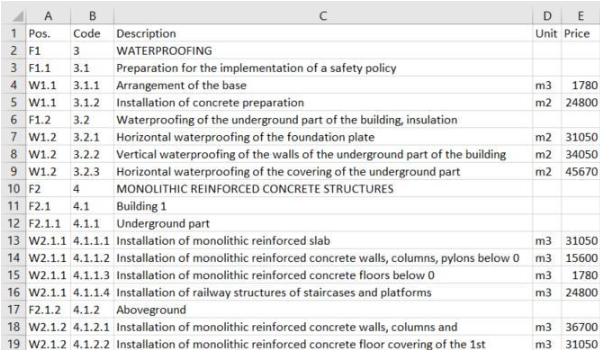
- The “Pos.” column contains a value in the format F1, F1.1, F2, F2.1, F2.1.1 or W1, W1.1, W1.2, W2.1.1, where F means that this line specifies a folder, and W creates a type of work.
1.1, 2.1, 2.1.1 - specifies the nesting of folders, i.e. F2.1.1 will be nested in F2.1, and that in turn in F2.
W2.1.1 - means that the work type must be created inside the F2.1.1 folder
Attention! W2.1.1 can and must be repeated for all work types that are placed in one folder, i.e. it is not increased by the last digit - this is not a sequential number, but an indicator of the location of the work type.
- The “Code” column indicates the work code.
- The “Description” column indicates the name of the folder or work type.
- The “Unit” column indicates the unit of measurement for the work type. Units of measurement are not specified for the folder.
- The “Price” column indicates the price per unit of work, which is used to upload Invoice to Tools For Navisworks