< TOOLS FOR REVIT. Utils | TOOLS FOR REVIT. Calculations >
Complete / Accept / Plan
Using the Completed, Accepted, and Planned commands, you can assign the corresponding status to committed items.
1. Click on the Acceptance panel ➤ Complete/Accepted/Schedule
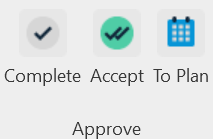
- Complete - date of actual completion.
- Accept - date of approval/payment for Invoice,3.
- Schedule - planned date with assignment of performer.
2. Select the items you want to assign a status to and click Done in the upper left corner
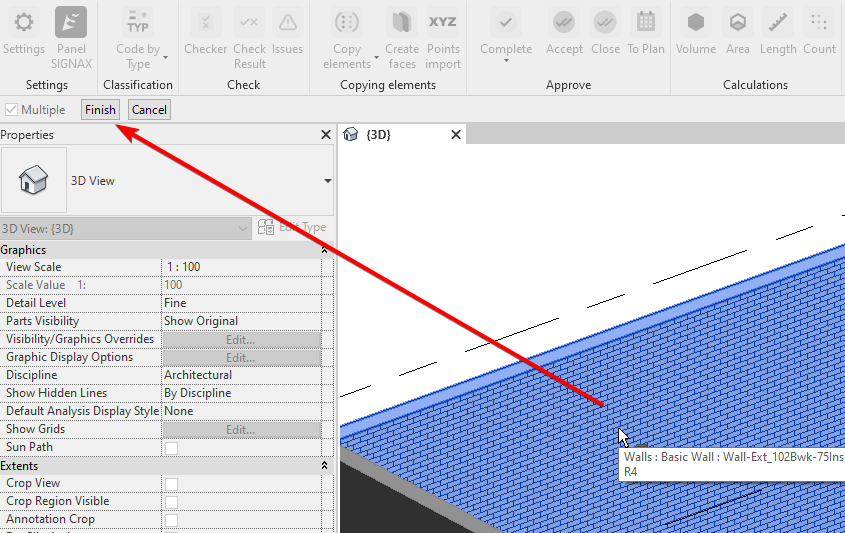
The Complete/Accept/Schedule command settings windows look the same
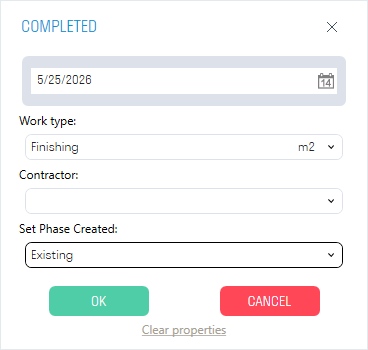
- In the “Date” line, specify the date for completing/accepting/scheduling the work
- In the “Work type” line, select the work type associated with the item from the list. Work can be added in two ways - manual entry or importing an Excel table (see “Setting up work types” for more details)
- In the “Executor” line, select the company that performs the specified work type from the list. The company can be added in the SIGNAX plugin Settings (see “Setting up companies” for more details)
- In the “Set construction stage” line specify the construction stage “Completed”. After that, the actually completed elements on the construction site will appear in the “3. Construction model (Navisworks)” view
- The “Clear properties” button deletes the S parameter values for the selected elements
3. After assigning the status, the corresponding parameters “S Completed”, “S Accepted” and “S Planned” appear in the properties of the selected elements in the “Construction” section. The following parameters also appear:
“S Work” - Name of the work;
“S Unit” - Units of measurement;
“S Color” - Color;
“S Contractor” - Contractor;
“S Quantity” - Quantitative characteristic calculated depending on units of measurement.

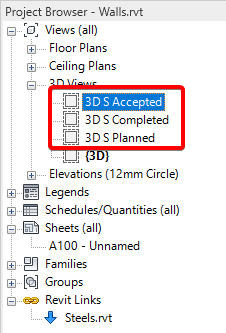
The “3D S Completed”, “3D S Accepted”, and “3D S Planned” views are created, with elements of the corresponding status marked in color (Completed - Green, Accepted - Purple, Planned - Blue)

< TOOLS FOR REVIT. Utilities | TOOLS FOR REVIT. Calculations >