< DASHBOARD. 50 Cards. 3D Cards | DASHBOARD. 90 Cards. Others >
What's New
Major changes are listed here. Click on the version number for details.
Notations
 — new features
 — functionality improvements
 — bug fixes
** 2025.29 ** 03.10.2025
Fixed incorrect display of data in the settings of card 62.
** 2025.27 ** 18.09.2025
Added the ability to select a role that is not active in the project in DOCS cards to pre-configure it for a template project or future users.
Fixed the display of project roles in card 66.
** 2025.26 ** 11.09.2025
Added the Percentage Complete column and implemented export to Excel from card 67.
Made numerous small improvements and fixed a number of bugs in cards 66 and 67.
** 2025.25 ** 04.09.2025
Fixed incorrect status assignment when closing card 67 approval.
Information about earlier updates is available in the closed Telegam channel for SIGNAX users. To add ** Contact support **.
62_Issues DOCS - the card displays all SIGNAX DOCS note statuses in the form of a graph.
Displaying the card in user mode

¶ Setting up a card

1-from the drop-down list, select the types of comments that need to be displayed on the graph
2-display comments with a cumulative effect or the number of comments issued on the date
3-display statistics by month
63_General reviews in DOCS- the card allows you to display statistics on approvals from SIGNAX DOCS in the form of a pie chart.
Displaying the card in user mode:

¶ Setting up the card
Select from the drop-down list the types of approvals that should be taken into account in the statistics.

64_Dynamics of reviews in DOCS- a card for displaying a graph of approvals. It is intended for analysis of documentation release dynamics.
Display in user mode:

When opening a card:

Card setup is similar to 63_General approvals in DOCS
65_Register of reviews DOCS- the card displays the approval register from SIGNAX DOCS.
Displaying the card in user mode

When opening the card:

By clicking on the line, it is possible to go to the approval in SIGNAX DOCS.


Card settings are similar to 63_General approvals in DOCS
66_SLA by Roles - the card displays the percentage of checks completed on time by user roles in the selected project
Card display in user mode
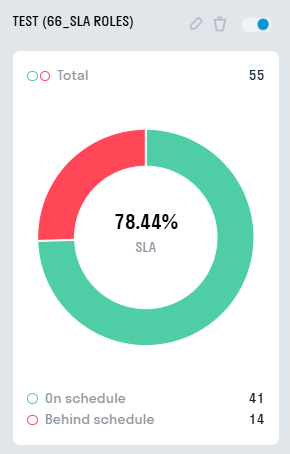
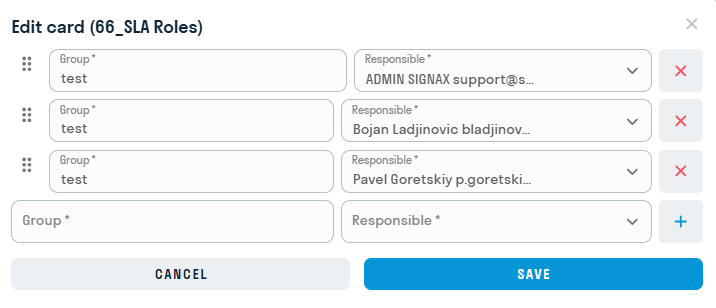
Editing a card is as follows: a group is created (it can be named as needed by the user), and responsible persons can be added to the groups (these can be either users or roles). Based on these responsible persons, SLA infographics will be built and a card diagram will be created.
When you open the card, a list of groups and their attributes (the average value of all responsible persons in the group) will open: SLA, number of approvals, approvals completed on time and approvals behind schedule.
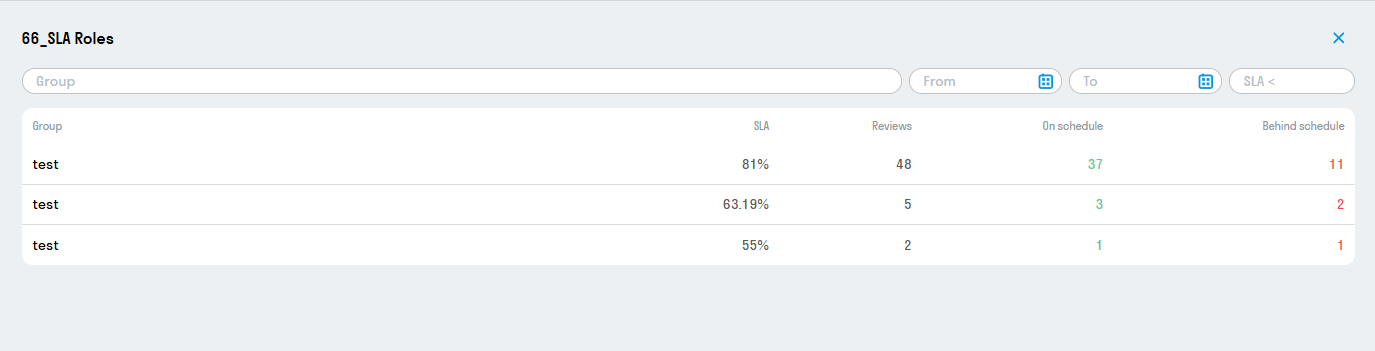
Clicking on any of the groups will open a full list of responsible persons in this group and the same attributes as for groups, but for a specific user:

At the top of each window, filters are provided for more convenient searching.
67_SLA by Approvals - the card displays the percentage of checks completed on time by approval type in the selected project

< DASHBOARD. 50 Cards. 3D Cards | DASHBOARD. 90 Cards. Others >